


 AI
AI
 Spotify to YouTube
 Spotify & YouTube Battles
 Stream Music
 GAMES
GAMES
 Song Identifier
 Discover Artists
 Share Music & Lyrics
 Concert Tickets
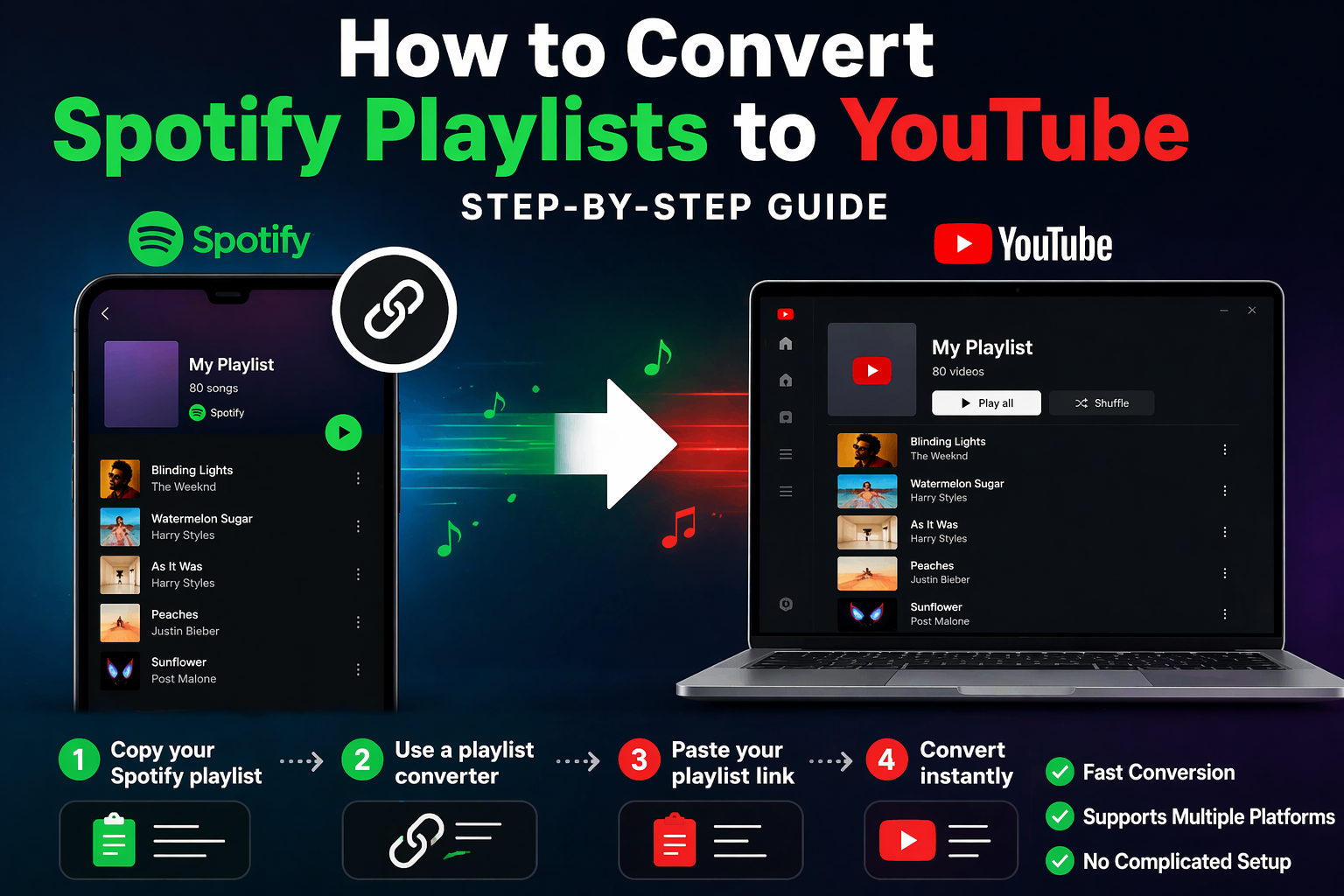
How to Convert Spotify Playlists to YouTube (Step-by-Step Guide)
Want to move your Spotify playlists to YouTube? Whether you are switching platforms, building a backup of your favorite playlists, or just want more flexibility in how you listen to music, converting a Spotify playlist to YouTube is easier than ever.
Many music fans spend a lot of time building the perfect playlist. After putting together favorite songs, organizing moods, and creating themed mixes, the last thing anyone wants to do is start over from scratch on another platform. That is why playlist conversion tools have become so useful. Instead of rebuilding your playlist one song at a time, you can transfer it quickly and keep your music experience moving.
In this guide, we will walk you through how to convert Spotify playlists to YouTube step by step, why people make the switch, and how MusicKraze makes the process simple.
Why Convert Spotify Playlists to YouTube?
There are many reasons people want to transfer Spotify playlists to YouTube. Some users prefer YouTube because it gives them access to official tracks, live versions, remixes, lyric videos, fan uploads, and music videos all in one place. Others want to explore music across different platforms without losing the playlists they already built.
Converting playlists can also be useful if you are trying to keep a backup of your music library, share playlists in different formats, or use multiple services depending on your device and listening habits. No matter the reason, having a reliable playlist converter saves time and frustration.
Is It Hard to Convert a Spotify Playlist to YouTube?
Not at all. Years ago, moving a playlist from one music platform to another could be annoying and time-consuming. You had to search for each track manually, rebuild the playlist by hand, and hope you did not miss anything. Today, playlist conversion tools make that process far easier.
With the right tool, all you need is your Spotify playlist link and a few clicks. That is where MusicKraze comes in. MusicKraze offers a simple converter that helps users transfer playlists without the usual hassle.
Step 1: Copy Your Spotify Playlist Link
The first step is to get the link to the Spotify playlist you want to convert. Open Spotify and go to the playlist you want to move. From there, use the share option to copy the playlist URL.
On most devices, this can be done by opening the playlist menu and selecting the share option. Once you copy the link, keep it ready because you will paste it into the converter tool in the next step.
Make sure you are copying the full playlist link and not just the playlist title. The link helps the converter identify the songs inside your playlist more accurately.
Step 2: Use a Playlist Converter
Once you have your Spotify playlist link, the next step is to use a playlist conversion tool. A good converter will read your playlist, match the songs, and help move them to another platform without forcing you to rebuild everything manually.
MusicKraze offers a playlist converter designed to make this process simple and fast.
Use MusicKraze’s converter tool here: https://musickraze.com/mk_converter.php
Instead of bouncing between apps and trying to search each track yourself, you can use the converter to streamline the entire process.
Step 3: Paste Your Spotify Playlist Link
After opening the converter, paste your Spotify playlist link into the input field. This tells the system which playlist you want to transfer. Once the link is entered, the converter will begin processing the playlist and preparing it for transfer.
At this stage, it is important to double-check that you pasted the correct playlist URL. If you manage multiple playlists, make sure you are converting the one you actually want moved to YouTube.
Step 4: Convert Your Playlist
Once your playlist link is in place, start the conversion process. The converter will work through the playlist and match the songs for YouTube. This removes the need to search for every track one by one.
Depending on the size of your playlist, the process may take a short amount of time, but it is still much faster than rebuilding everything manually. For anyone with large playlists, this can save a huge amount of effort.
Why Use MusicKraze to Convert Spotify Playlists?
There are several reasons why MusicKraze is a smart option for playlist conversion.
Fast Conversion
Nobody wants a complicated transfer process. MusicKraze is built to make converting playlists quick and straightforward.
Supports Multiple Platforms
Music listeners do not always stay on one platform forever. MusicKraze is useful for people who want more freedom with their playlists and a better way to manage music across services.
No Complicated Setup
Some playlist tools feel overly technical or cluttered. MusicKraze keeps things simple, making it easier for everyday users to convert playlists without confusion.
Built for Music Fans
MusicKraze is not just a utility page. It is part of a larger music-focused platform built around discovery, music sharing, community, and listening. That makes it a natural fit for users who want more than a one-off tool.
Benefits of Moving Playlists Between Platforms
When you convert your Spotify playlists to YouTube, you get more control over how and where you listen. You are no longer locked into one service. You can keep your favorite mixes available in more than one place, adapt to different devices, and explore the strengths of each platform.
YouTube can also expose you to versions of songs that may not appear in the same way on traditional streaming platforms, including alternate uploads, live performances, edits, and visual content. For many listeners, that makes YouTube a powerful companion to standard music streaming.
Common Reasons People Transfer Spotify Playlists
Here are some of the most common reasons people convert Spotify playlists to YouTube:
- They want a backup copy of an important playlist
- They are switching from Spotify to YouTube
- They want more flexibility across platforms
- They want access to music videos, live cuts, and alternate uploads
- They do not want to rebuild playlists manually
- They use different apps on different devices
Whatever your reason is, using a converter saves time and helps protect the work you already put into building your playlists.
Tips for Better Playlist Transfers
To get the best results when converting playlists, keep these tips in mind:
- Make sure your Spotify playlist link is correct
- Use clearly organized playlists whenever possible
- Review the final results after conversion
- Keep backups of your most important playlists
- Use trusted tools that are designed for music users
While most songs match well, it is always a good idea to review your converted playlist afterward and confirm everything looks right.
MusicKraze Makes Playlist Conversion Simple
One of the biggest frustrations with playlist migration is how much manual work it usually takes. MusicKraze helps reduce that friction by offering a dedicated converter page that is easy to use and built for people who just want the job done quickly.
If you are already part of the MusicKraze platform, this also fits naturally into a larger music experience. You are not only converting playlists. You are using a music-focused platform that also supports discovery, interaction, and other features for music fans.
Final Thoughts
Playlist conversion should not be complicated. If you have already spent time creating great Spotify playlists, you should not have to start over just because you want to use YouTube too. With the right tool, moving your playlist is fast, simple, and far more convenient than rebuilding everything by hand.
If you are ready to convert your Spotify playlist to YouTube, try the MusicKraze converter here: https://musickraze.com/mk_converter.php
Music should move with you. Your playlists should too.
Frequently Asked Questions
Can I convert a Spotify playlist to YouTube for free?
Yes, using a playlist converter makes it much easier to move playlists without rebuilding them manually.
Why would I move a Spotify playlist to YouTube?
Many people want more flexibility, access to music videos and alternate versions, or simply want to use playlists across different platforms.
Is converting playlists easier than rebuilding them manually?
Yes. A good converter saves a lot of time by handling the transfer process for you instead of forcing you to search for each song individually.
Where can I convert my Spotify playlist?
You can use the MusicKraze playlist converter here: https://musickraze.com/mk_converter.php
